Septic pumping and grease trap software

The #1 app in the #2 business.

Why use our app? It's faster than your guts after eating Bobby's Burrito Mobile.

Septic pumping software for small crews anywhere in the US. Routes, jobs, manifests, fleet tracking with optional live GPS and automatic mileage, disposal tracking, and compliance logs from federal and all 50 state rule presets, in one app built for the truck cab. It works with no signal and syncs when you're back in range.

$19.99/mo. All in. Unlimited trucks. No Bull 💩 Unlimited users too, one price per company. No setup fees, no add-ons.

💩💩💩💩💩 Rated 5 poops (by us, obviously). Our own totally biased rating, not a customer review.

Cartoon pump truck wearing a yellow superhero cape, flying with a hose coiled at its side.
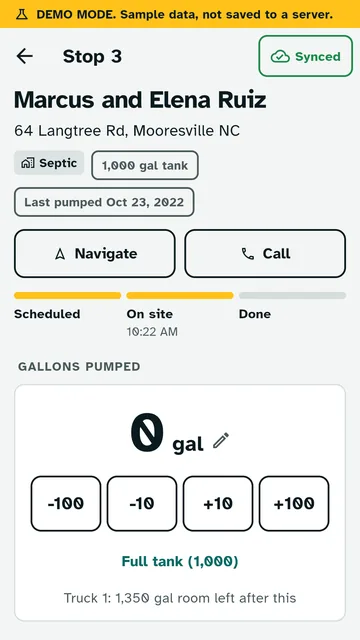
Outfall job screen: stop 3, gallons pumped counter with plus and minus buttons, and full tank shortcut.
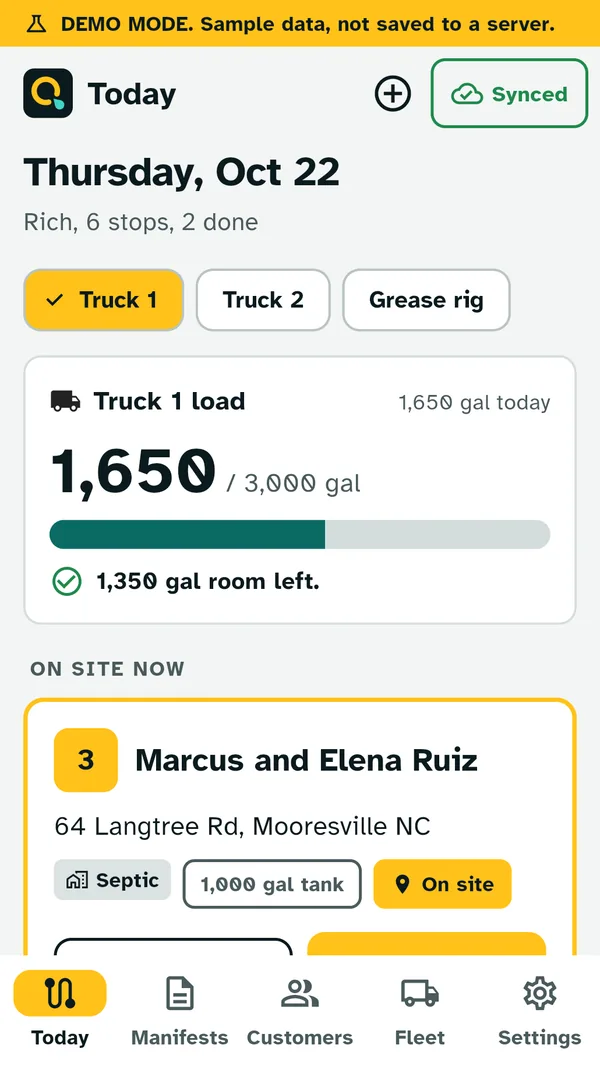
Outfall Today screen: Truck 1 load of 1,650 out of 3,000 gallons, and the customer on site now.

Real app screens in demo mode, with sample data.

Paperwork shouldn't be the hardest thing you haul.

  • Clipboard logs get wet, lost, or left in the other truck.
  • Annual permit renewals mean digging up 12 months of gallons by hand.
  • Rural dead zones and apps that quit the second the bars drop.
  • Per-truck pricing that punishes you for growing.
Cartoon clipboard with a happy face, holding a pencil next to a checklist with three check marks.

We handle your business so you can handle theirs.

Every pump-out is logged as it happens: gallons, tank condition, photos, signature and where the load went. Your state log and reports come straight from the jobs your drivers already finish.

Flush with features.

Everything a small pumping company needs from the yard to the treatment plant. No fluff, plenty of flow. Dig into septic pumping software, grease trap service software or the septic manifest app.

Fleet tracking

Keep tabs on every tank

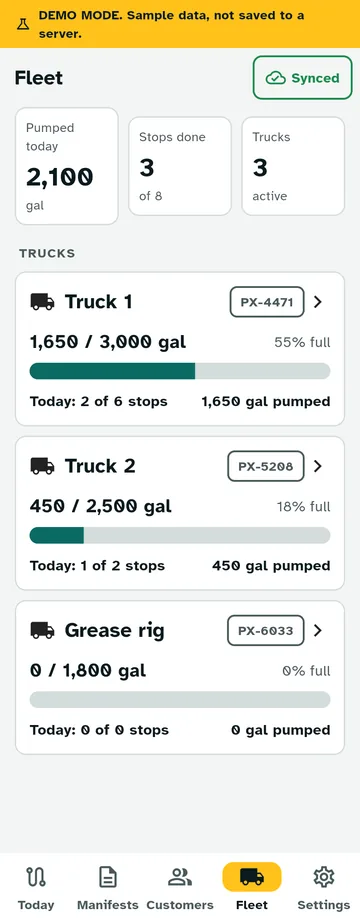
See every truck on one screen: its load against tank capacity, how full it is, stops done today and gallons pumped. Assign a truck and a driver to each job, and drivers open the app to their own truck's route. Tap a truck for its last 7 days and today's stops in order. Unload at the plant and record the dump to set the tank back to empty. Want dots on a map? Turn on optional live GPS.

The route of all good

Today's stops for each truck in driving order, with the load in gallons and room left in the tank.

Pump, log, sign, go

Arrive, pump, record gallons and tank condition, snap photos, run the checklist, get the customer's signature, then pick the disposal site.

Manifest destiny

Manifests build from the job and share as a PDF. No retyping, no smudged carbon copies.

No tank left behind

A due soon list so nobody's tank sits overdue. Due dates follow your rule intervals.

Flushed and synced

Everything saves on the phone first and syncs when you're back in range. Nothing goes down the drain.

The whole crew, one price

Customers, sites, tanks, trucks and team members with owner and driver roles. Add as many as you want.

A paper trail, minus the paper

Changes to completed jobs and manifests are logged: who, when, and what changed.

Every mile, no BS

Optional live GPS puts every truck on a map, and the automatic mileage log adds up miles by truck, driver, day and state.

Built for gloves, not desks

Big buttons for gloved hands, high contrast day and night themes, and screens you can read in the sun.

Slicker than whale

Real screens from the app in demo mode. Big buttons, fast screens, and it keeps working when the signal quits.

Outfall Fleet screen in demo mode: gallons pumped today, stops done, and three trucks with their loads, tank capacity and percent full.

Fleet

Know where the goods are going

Every truck's load, today's stops and gallons pumped, all on one screen. Each job records the truck, the driver, and the disposal site where the load went, so you know what's in every tank and where it ended up.

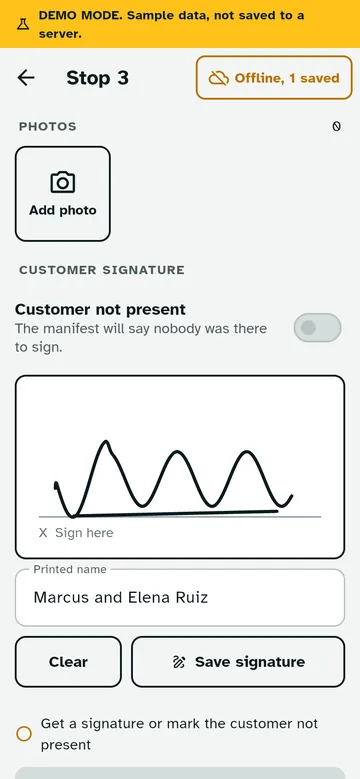
Outfall job screen with a photo button and a customer signature box.

On site

Sign here, please (and thank you)

Photos and signatures stay with the job in private storage only your company can reach. If nobody's home, mark the customer not present and keep rolling.

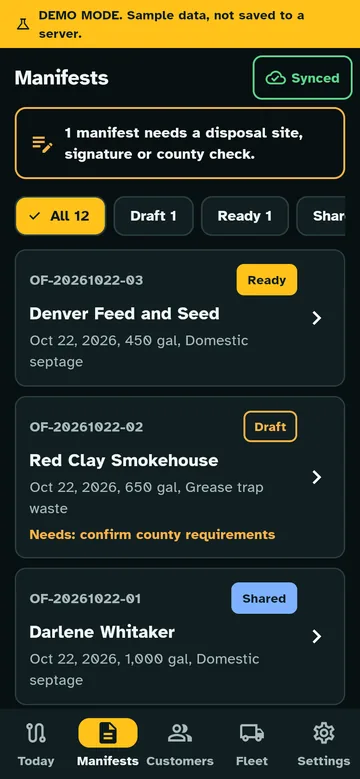
Outfall manifests list in night theme, with ready, draft and shared manifests.

After the dump

Manifests that don't stink

See which manifests are ready, which are drafts, and which still need a disposal site, signature or county. Share the PDF from your phone.

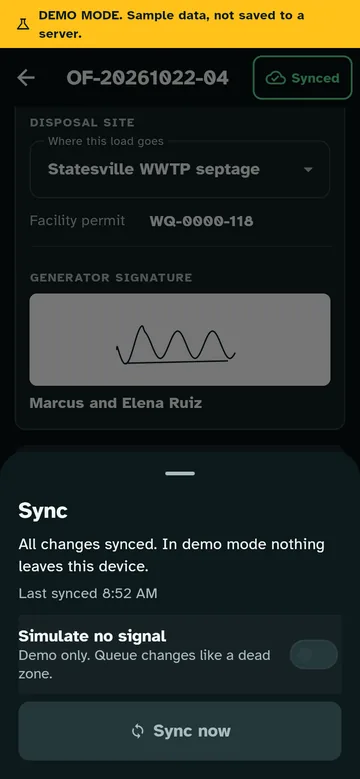
Outfall sync sheet in night theme showing all changes synced.

No bars? No problem.

Dead zones don't stop the flow

Work the whole route with zero signal. Jobs and manifests queue on the phone and sync on their own when you're back in range.

Cartoon phone giving a thumbs up between a gray no-signal cloud and a bright cloud with a check mark.
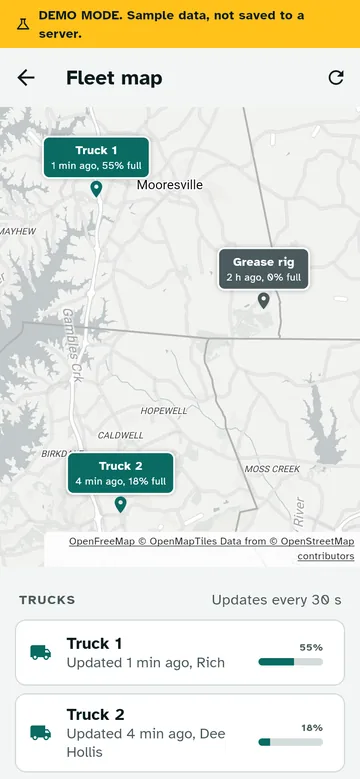
Outfall fleet map in demo mode: three trucks on a map with how long ago each one updated and how full its tank is.

Live GPS and mileage

Tracking your number twos in real time

Turn on optional live truck tracking and every truck shows up on a fleet map with how full it is, updated about once a minute while it rolls. Turn on the automatic mileage log and every mile lands in a report by truck, driver, day and state, as PDF or CSV.

Both are off until an owner turns them on. Drivers agree on their own phone, always see a notice while their truck is shared, and it only runs on shift or on a job.

Compliance without the strain.

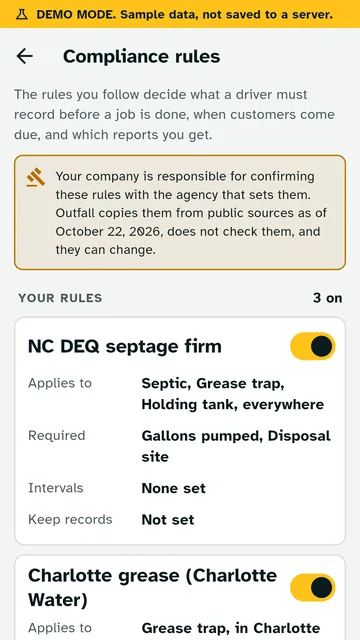
Federal and all 50 state rule presets, plus city grease rules, or set your own. Texas, Florida, Ohio, North Carolina or anywhere else (DC too): pick your state and cities, and every preset shows its public source. See septage rules for all 50 states.

State presets All 50 states + DC

Who regulates you, whether you need a permit, what to record on every pump-out, how long to keep it and what to report. Where a state leaves septage to the counties, the preset says so and points you to your county health department.

Federal EPA Part 503 Nationwide

For septage you land apply: the 40 CFR Part 503 records, like the site, application rate, pathogen and vector steps and the signed certification, kept five years.

City grease trap presets

  • Houston, Dallas, Austin, San Antonio, Fort Worth, El PasoTexas cities, traps pumped at least every 90 days
  • PhoenixOutdoor every 90 days, under-sink every 30
  • JacksonvilleOutdoor every 90 days, under-sink every 15
  • NashvilleOutdoor every 90 days, under-sink every 30
  • Boston and Washington, DCOutdoor every 90 days, under-sink every 30
  • Charlotte, Greensboro, Durham, Cary, and moreEach city's own interval or records rule
  • Custom rulesYour county, your city, your way
  • Jobs can't be completed until the fields your rules require are filled in.
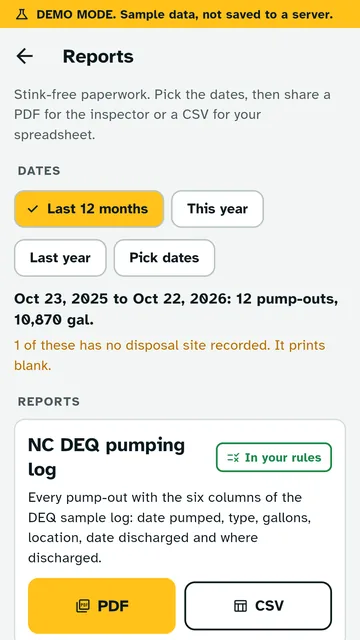
  • Reports for any date range as PDF or CSV: your state pumping log, period summaries, the annual renewal summary, manifests, and grease trap service records for each site.
  • Rules look off for your state or city? Tell us right from the rules screen in the app, or email support@getoutfall.com, and we'll fix them or build custom rules for you.

Rules are researched from public sources and were last verified October 22, 2026. They can change, and none of this is legal advice. Confirm your rules with your state or local regulator. Outfall is not approved, endorsed or certified by the EPA, any state agency or any city.

Outfall compliance rules screen in demo mode with two example presets turned on: a state septage preset and a city grease preset.
Outfall reports screen in demo mode with date range buttons and PDF and CSV export for the state pumping log.

Demo screens showing one example state (North Carolina) and city (Charlotte). You'll see the presets for your own state and cities.

Three steps. No plunger required.

  1. Sign up on the web

    Your company signs up and pays here on the website, monthly or yearly. Billing happens on this site, never in the app.

  2. Download the free app

    The app is a free download for every driver. Nothing to buy inside it. It is in final testing, and we email every customer the download link the day it hits the stores.

  3. Log in and roll

    Sign in with an emailed link, invite your crew, set your rules, and start the route. Number two, done right.

One plan. No crappy fine print.

Plenty of septic software charges by the truck. We charge by the company. Add trucks, add drivers, add the office manager's cousin. Same price.

Cartoon toilet paper roll in a hard hat and safety vest, holding a phone and giving a thumbs up.

Outfall

$19.99/mo per company

$19.99/mo. All in. Unlimited trucks. No Bull 💩 One flat price per company. No setup fees, no per-truck fees, no per-user fees, no add-ons.

  • Unlimited trucks
  • Unlimited users and drivers
  • Fleet tracking for unlimited trucks
  • Every feature, no paid add-ons
  • Routes, jobs, manifests and disposal tracking
  • Federal and all 50 state rule presets, plus city grease rules, or set your own
  • State logs and reports as PDF or CSV
  • Optional live GPS and automatic mileage
  • Offline work with automatic sync
  • Free app download, paid on the website

Or $199.90/yr. Two months free. Same plan, paid once a year.

Secure checkout by Stripe. Cancel anytime. No free trial is offered. Already a customer? Manage billing.

Per-truck pricing adds up fast

Monthly cost for a company with 3 trucks, based on published prices
For a 3-truck companyPer month
Outfall$19.99
Tank Track ($180 first truck, $150 each extra truck)$480
RouteHouse Grease ($99 to $249 per truck, billed yearly)$297 to $747

Prices as published on tank-track.com and getroutehouse.com/grease, checked October 2026. They can change. Those products include features Outfall does not have, such as invoicing and payments.

Cartoon yellow food truck speeding along with a giant smiling burrito on the roof.

Speed you can feel in your gut.

Why use our app? It's faster than your guts after eating Bobby's Burrito Mobile.

Big buttons, fast screens, and no waiting on a signal. When the route is long, every tap counts.

Questions you've been holding in.

How much does it cost?

$19.99 a month per company, or $199.90 a year (two months free). That covers unlimited trucks and unlimited users. One plan, so there's nothing to upgrade to.

Is it really all in, or is there a catch in the pipes?

All in. No crap about it. $19.99 a month per company gets every feature in the app, unlimited trucks and unlimited users. No setup fees, no per-truck fees, no per-user fees and no paid add-ons. Pay $19.99 a month, or $199.90 a year and get two months free.

Does fleet tracking show my trucks on a live map?

Yes, if you want it. Live truck tracking is optional and off until an owner turns it on. Then each truck shows up on a fleet map with how full it is, updated about once a minute while it's moving. Drivers agree on their own phone, always see a notice while their truck is shared, and it only runs on shift or on an active job. The trail is deleted after 30 days. The automatic mileage log is a separate switch that adds up miles by truck, driver, day and state. Tap Navigate on a stop and your phone's maps app gives you directions.

Is there a free trial?

No. You pay on this website, not in the app, and you can cancel anytime.

How does billing work, and can I cancel?

You subscribe here on the website through Stripe, monthly or yearly. It renews automatically until you cancel. Cancel anytime from Manage billing and you keep access until the end of the period you paid for. No cancellation fees. The same page updates your card and shows your invoices.

Do my drivers have to pay for the app?

No. The app is a free download, and you log in with your company's account. Add as many drivers as you have.

Does it work with no signal?

Yes. Everything saves on the phone first and syncs when you're back in range. Dead zones don't stop the flow.

Does it work in my state?

Yes. Outfall has rule presets for all 50 states and DC, plus the federal EPA Part 503 rules for septage you land apply. Pick your state, and Texas, Florida, Ohio or North Carolina crews each get their own state's rules. Run in more than one state? A site can have its own state, and each state's rules only apply to sites in that state.

Which cities have grease trap presets?

Houston, Dallas, Austin, San Antonio, Fort Worth, El Paso, Phoenix, Jacksonville, Nashville, Boston, Washington DC, Charlotte, Greensboro, High Point, Winston-Salem, Durham and Cary. Anywhere else, set your own rules for the fields you must record and how often traps are due.

What if my state or city rules look wrong or are missing?

Tell us. Use the feedback link on the rules screen in the app, or email support@getoutfall.com, and we'll fix the preset or build custom rules for you. You can also edit any rule yourself, and your copy stays with your company.

Is Outfall approved by any agency?

No. Outfall is not approved, endorsed or certified by the EPA, any state agency or any city. Rules are researched from public sources, every preset shows its source, and they were last verified October 22, 2026. Rules change, so your company is responsible for its records and for confirming its rules with your state or local regulator.

Does it do invoicing or take payments?

No. Outfall sticks to routes, jobs, manifests, compliance and reports. Keep your books where you keep them now.

What happens to my data?

Your records stay with your company. The app has no ads and no analytics. Read the full privacy policy.

Who makes this?

Inferno45, a small shop in North Carolina. Ricardo spent 12 years as a firefighter and has 20+ years in IT, so he builds for people who work outside and can't wait on slow software.